Local network only
Tasmota app for iPhone and Android
TasmoShelf finds the Tasmota devices on your Wi-Fi, gives each one the controls it actually has, and keeps their timers, backups and energy readings in one place. It can hand them to Apple Home as well. None of that needs an MQTT broker or a Home Assistant server: everything runs over your own network.
Free for up to three devices. The full version is 9.99 € once, no subscription.
- No account
- No cloud
- No MQTT broker
- iOS and Android
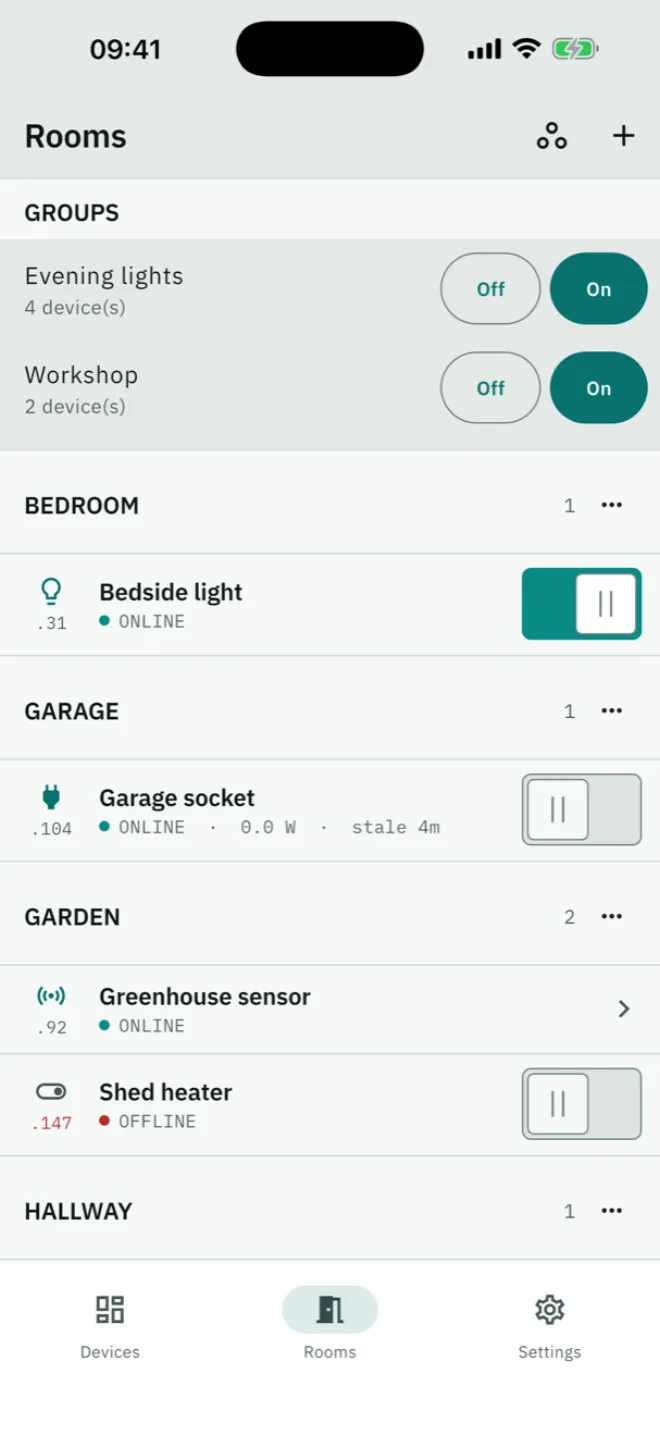
A device row, as the app draws it. The switch works — try it.
New in 0.3.1. Scenes that remember what every device was doing and put it all back with one tap. An auto-off per socket, and a rule the device runs by itself: switch off once the load has finished. Reach your devices from outside the house through your own VPN. A Control Center switch and lock-screen widgets on iOS, a home-screen widget and a Quick Settings tile on Android. Temperature and humidity now get the same trend line power has had all along. And six more languages. This page describes what the app does today, not what it might do one day.
Controls
A colour wheel for the bulb, fixed steps for the fan
Every Tasmota device describes itself when asked. TasmoShelf reads that answer and draws the matching control: a colour wheel for a colour bulb, a warm-to-cool slider for a tunable white one, three large targets for a shutter, four fixed steps for a fan. You never pick a device type from a list, and nothing you switch, dim or schedule sends you to the device's own web page to finish the job.
| Device | What you get |
|---|---|
| Relay | One switch per output, labelled with the name you gave that output on the device itself |
| Dimmable light | Brightness slider, plus explicit steps for precise or assisted operation |
| Colour bulb | Hue and saturation with live preview, and brightness |
| Tunable white | Warm-to-cool slider shown in kelvin, and brightness |
| RGBCCT | Colour, colour temperature and the separate white channel |
| Shutter | Open, stop, close and a position slider that shows where it is heading while it moves |
| Fan | Off, low, medium, high as fixed steps, because that is what the hardware has |
| Energy plug | Live watts in the list itself, today, yesterday, total, voltage, current, an hour of history, a month total with a cost projection, CSV export, and counter resets without leaving the app |
| Sensor node | Every reading the device publishes, including sensors this app has never met. The unit comes from the device |
Immediate response
A control moves the moment you touch it and is corrected by the next reading. If the device refuses, it moves back, visibly.
The names you already chose
Devices appear under the names you gave them, including a separate name for each relay of a multi-relay device.
Ask before switching
Mark a freezer or a server and TasmoShelf asks first. Off by default, set per device.
Apple Home
Connecting Tasmota to Apple Home
Newer Tasmota firmware speaks Matter on its own, and Apple Home understands Matter directly. TasmoShelf reads chip and firmware of every device and tells you which ones can join Apple Home right away, which need a small bridge, and which want a firmware update first. One tap opens pairing and shows the setup code. From then on, Siri and your scenes switch the device; nothing else runs in between.
TasmoShelf checks
The app reads chip and firmware of every device and marks it: ready for Apple Home, needs the bridge, or wants a firmware update first.
One tap to pair
Pairing opens on the device itself, and the QR code and setup code appear right in the app.
Scan, done
Scan the code with the Home app. From then on Siri, scenes and automations switch the device, over your own network, with no service in between.
ESP32 devices join directly
Tasmota 13 or newer on an ESP32 is a Matter device in its own right. TasmoShelf opens pairing and shows the QR code and setup code right in the app.
ESP8266 devices need a helper
The older chip cannot speak Matter itself. A single ESP32 running Tasmota can bridge them into Apple Home, and TasmoShelf tells you which of your devices that concerns.
TasmoShelf stays the toolbox
Apple Home switches and dims. Finding, setting up, energy readings and diagnosis stay here; Apple Home shows none of that for Tasmota devices.
Siri works without Matter too
On iOS, the app brings its own Siri shortcuts: “Turn on the pond pump” switches the device over your Wi-Fi, no pairing needed. Matter remains the way into scenes and the Home app.
Fleet
Managing more than a few devices
Past a handful of devices, the work changes: it stops being about switching one plug and becomes keeping the whole set in order. TasmoShelf schedules, groups, backs up and commands all of them from one place. The schedules live on the devices themselves, so they fire with the phone off and without any server.
Timers that live on the device
One device's schedule: on weekday mornings, again at sunset, off at night. One switch pauses the whole schedule without losing it.
One switch for a whole group
One tap switches a whole group. The pond pump and the fountain sit in different rooms and are still one switch.
A console that speaks Tasmota
The console speaks every Tasmota command, suggests the common ones, and keeps your history.
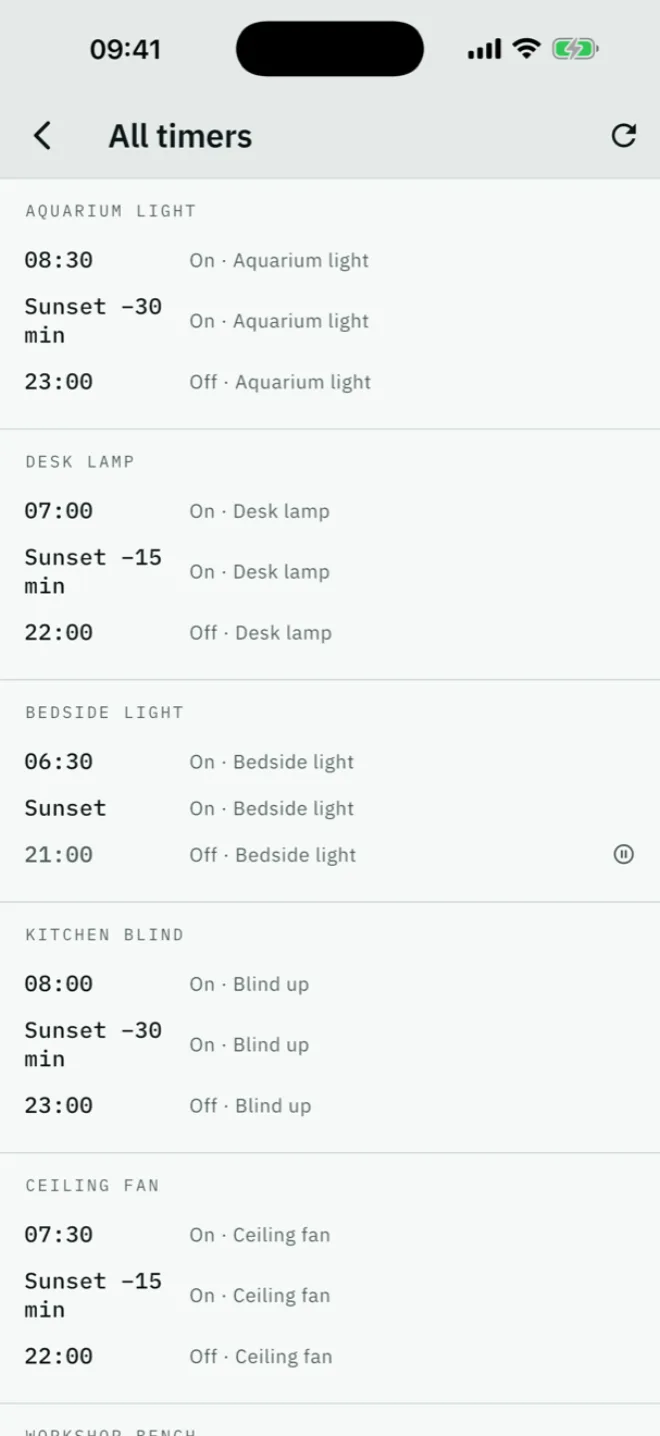
Every timer, one list
Every timer on every device in one list: what fires tonight, without opening ten device pages.
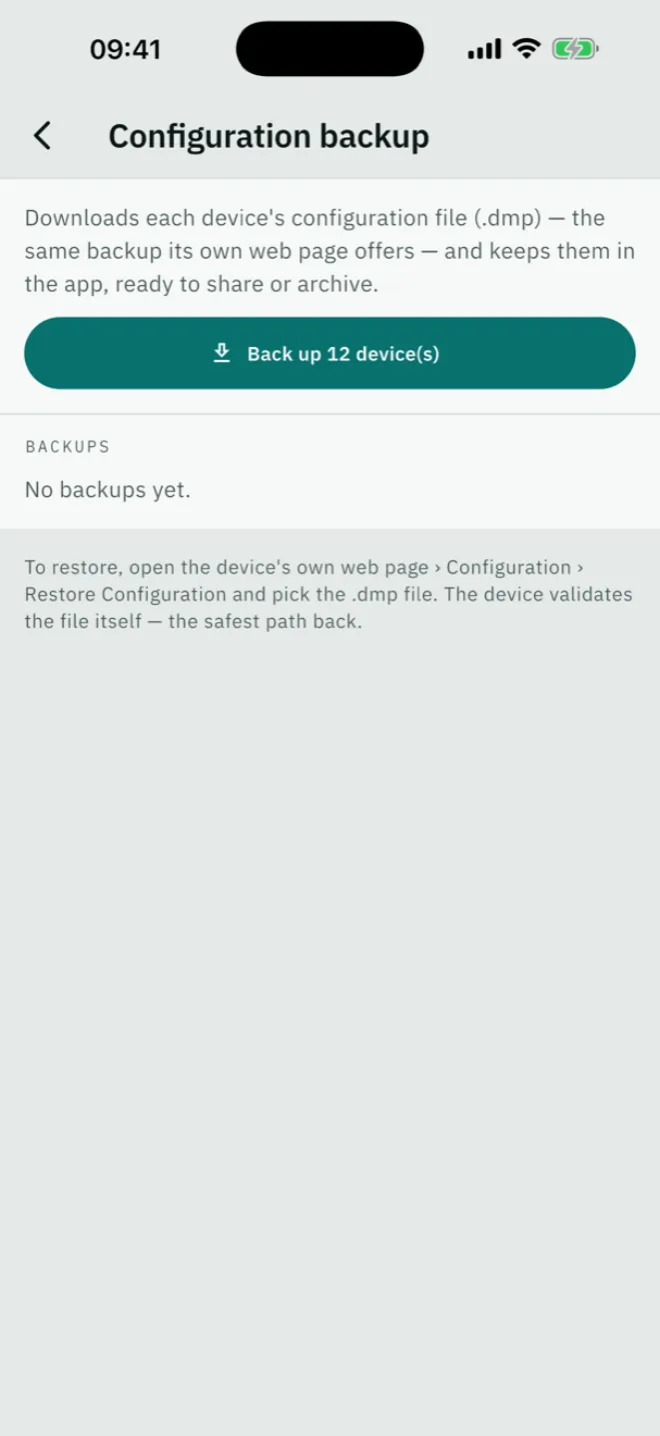
A backup of every device
One tap downloads each device's configuration file. Share the set, archive it, sleep better.
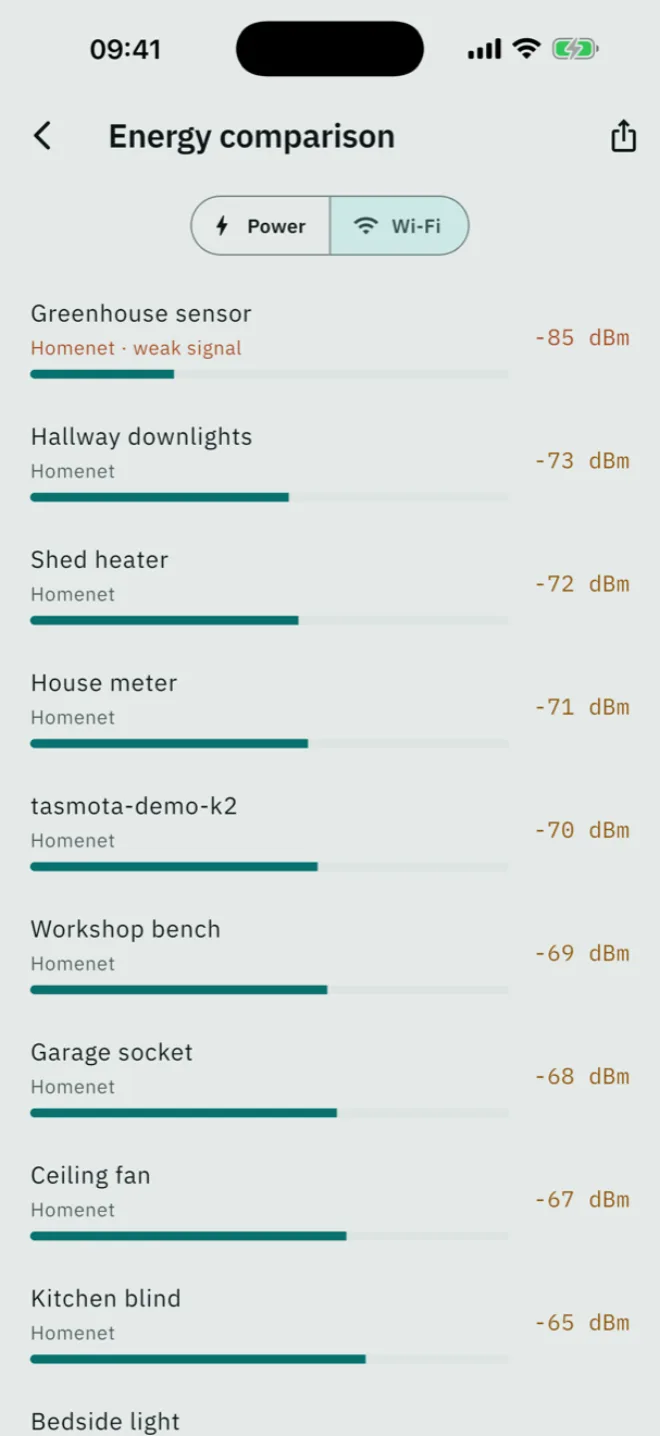
The Wi-Fi ranking
The Wi-Fi ranking answers a different question: which device hangs badly in the network.
Everything off when you leave
One action switches every output on every device off. Restart all, or start every device's firmware update, the same way, each with a count of what worked.
Setup without a browser
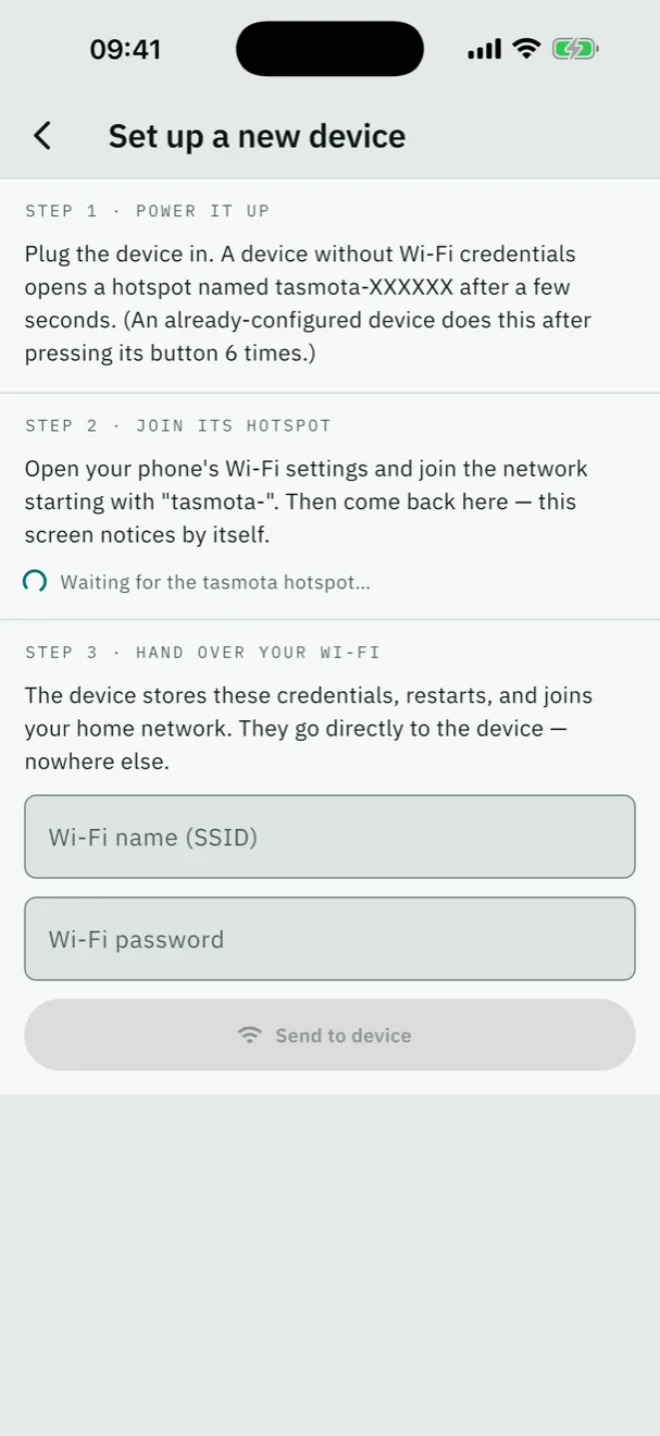
A freshly flashed device opens its own hotspot. TasmoShelf meets it there and hands over your Wi-Fi. Nobody types credentials into a page at 192.168.4.1 anymore.
Sunrise needs a location
Sun timers are computed on the device, which ships with a placeholder position from the factory. The app writes your phone's location onto it once, and every sun timer is right.
Price
Price and download
TasmoShelf is free for up to three devices, and the free version is not cut down: every control, the energy view and the full catalogue are there. The full version removes the device limit for a one-time 9.99 €. No subscription, no ads, and no account on either platform.
iOS
For iPhone and iPad, from the App Store. The unlock is a one-time in-app purchase inside the app.

Android
A direct download from this page — no Google account, no store. The licence key arrives by email and the phone checks it itself, offline. There is no activation server and no need to be online every few days.
Other builds: for older 32-bit phones · SHA-256
Discovery
Finding Tasmota devices on your Wi-Fi
Most Tasmota builds do not announce themselves on the network, so TasmoShelf looks for them by address. It sweeps your subnet twice: once quickly, then again over everything that stayed silent. A device with power saving switched on answers a ping instantly but can take several seconds to accept a connection. A single fast pass misses exactly those devices.
Another subnet
If your devices live on their own VLAN, set the range yourself. Adding a device by IP address always works too.
Honest results
If nothing on the network could be reached at all, TasmoShelf says so rather than claiming you have no devices.
Devices with a password
A device with a web password is still found, and you unlock it in place. The password stays in the phone's keychain.
Coverage
Device support
2666products the app can name offline
TasmoShelf carries a copy of the community template catalogue, so it can name a device without asking the internet anything. Support does not depend on that list, though: controls come from what a device reports about itself, so a Tasmota device nobody has catalogued works just as well.
Privacy
Everything stays on your phone
There is no account, and the app talks to no server of ours. Nothing about your use is measured. TasmoShelf opens connections to one kind of address: the devices on your own network. Device passwords go to the system keychain. This website loads no fonts, scripts or images from anywhere else either.
Access
Usable without looking
The bar is EN 301 549, which is WCAG 2.1 level AA. A screen reader gets one sentence per device rather than a pile of fragments. State is always written out, never signalled by colour alone. Touch targets meet the 48-pixel minimum, and both light and dark themes are checked for contrast.
FAQ
Common questions
Do I need an MQTT broker?
No. TasmoShelf uses Tasmota's HTTP interface, which is on by default. Nothing has to be installed or changed on the device.
Do I need Home Assistant or another server?
No. TasmoShelf talks to each device directly and covers what most people run a server for: finding devices, switching them, timers, backups and energy readings. If Apple Home was the reason for a server, the app handles that step too, via Matter.
Does it work without internet?
Yes. It only ever talks to your local network, and the product catalogue ships inside the app, so even first use needs no connection.
Can I switch things from outside the house?
There is no remote access built in, and that is deliberate: it would mean exposing your devices or running a relay service in between. What does work is a VPN into your own network — to the app that looks like being at home, and everything behaves normally.
My device has a password. Is that a problem?
No. It is found like any other and you enter the password once. It is kept in the phone's keychain and sent as standard HTTP authentication.
What about Shelly, Home Assistant or ESPHome?
TasmoShelf is for Tasmota. If you already run Home Assistant, its own app covers more ground; this is for people who would rather not run one. And if Apple Home was the only reason you considered a server: that step TasmoShelf now handles directly.
Does Apple show a warning when pairing?
Yes, once. Tasmota's Matter support cannot be certified — the programme is closed to free firmware — so Apple calls the accessory uncertified during setup. Confirm it and the device behaves like any other.
Do I need a HomePod or Apple TV?
Not for pairing and switching at home from your iPhone. For automations and access from outside, Apple requires a home hub, meaning a HomePod or an Apple TV.
Do timers keep working when the phone is off?
Yes. Timers are stored and executed by the device itself; the app is only their editor. Sunrise and sunset are computed on the device too, from a location you set once.
What exactly does the backup save?
Each device's own configuration file, the same .dmp its web page offers: Wi-Fi, names, calibration, timers, everything. Restoring goes through the device's web page, which validates the file itself — the safest path back.
What does it cost?
Free for up to three devices, with nothing held back — every control, the energy view, the whole catalogue. The full version is 9.99 € once. No subscription, no ads.